Websites & Apps

Websites & Apps, made for your business.

A website customers find on their phone, a desktop app for Windows or macOS, a phone app for Android or iOS. Pick one and watch a sample build itself.

Build a sample site or app in 10 seconds

Sample data · simulation

What to build
Your business
Colour
View

  • Planned first. Goals, users and screens on paper before any code.
  • Checked. Websites readable for everyone (WCAG 2.1 AA); apps tested on the systems you use.
  • Looked after. Updates and fixes after launch — website care from €25/month.

One-pager from €150Custom website €400–€900Apps: quoted after a first call

Download and try

Three apps I built — install one and see how it works.

They work offline once installed, and your files stay on your device. The sample files use made-up companies.

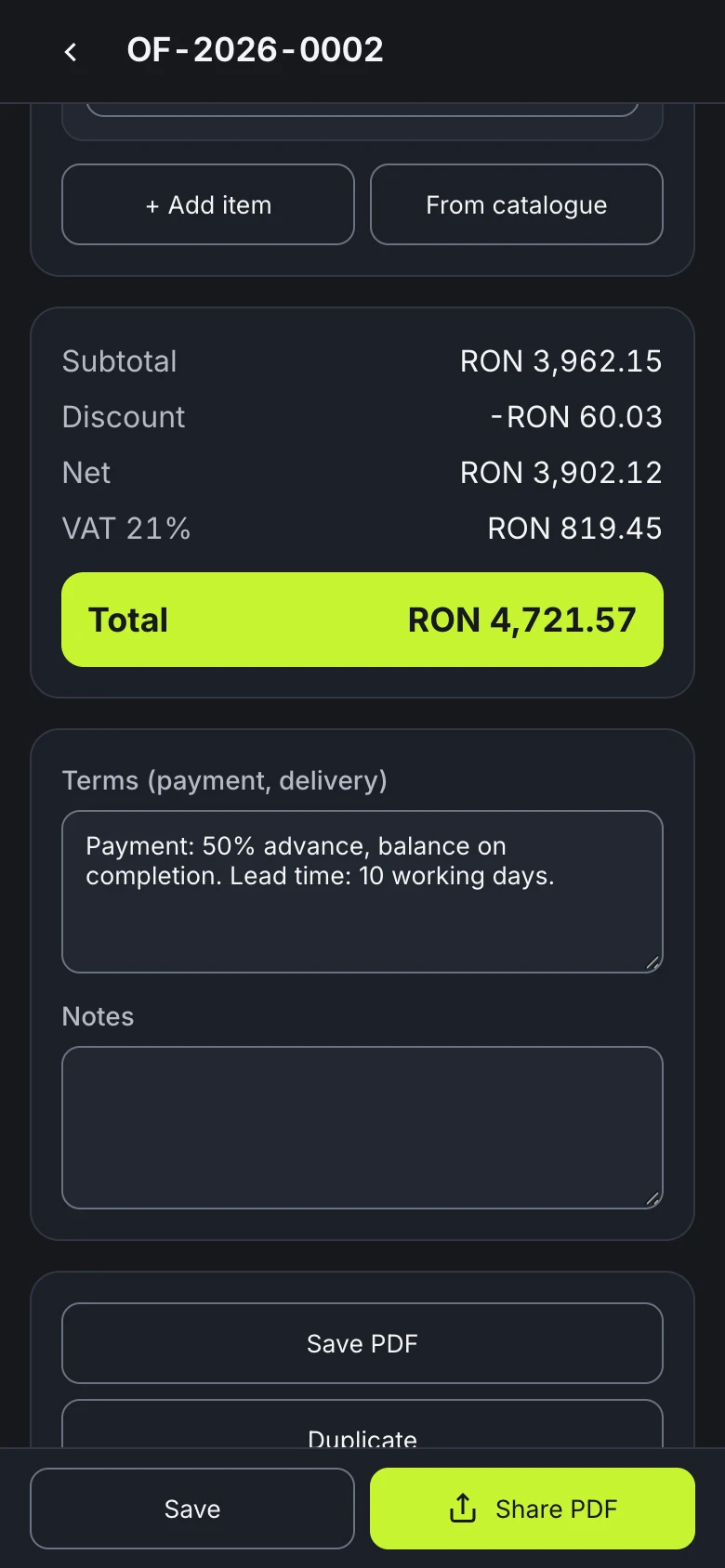
TAI Quote on a phone: the totals of a sample quote — subtotal RON 3,962.15, discount, net, VAT 21% and the total, RON 4,721.57

Phone · Android · iPhone

TAI Quote Version 1.1.3

Price quotes on the spot: catalogue, VAT, totals and a branded PDF to share on WhatsApp or email — offline. Not an invoice.

What it does
  • Your company details and logo, set once
  • A catalogue of products and services; clients remembered
  • VAT 21 / 11 / 0% (editable) or non-VAT payer
  • A4 PDF in Romanian, English or Turkish, shared from the phone
  • See an example PDF before you enter anything

Works offline once installed. The Android app has no internet permission; your quotes stay on the phone.

automated checks · 0 requests to other servers

How it was tested

36 unit tests (VAT and totals to the cent, thousands separators per language, numbering, storage, PDF text); 32 end-to-end checks in mobile Chrome at 390×844 and the same 32 in WebKit, the engine of Safari on iPhone, including opening with the server switched off; 40 checks of the audit fixes and the example PDF in each of the two engines; 22 checks on an Android 14 emulator, including that the app has no internet permission. Requests to other servers measured: 0.

Limits

The iPhone version was tested in the WebKit engine, not on a real iPhone. Installed outside the stores, so Android asks for permission and may warn. A quote, not an invoice. Quotes live on the device: deleting the app or clearing browser data removes them — the JSON backup in Settings keeps a copy. The PDF supports Latin-script languages only; Cyrillic or Greek letters are left out.

Source type

Test reports — not shown.

On iPhone or iPad: open it in Safari, then Share → Add to Home Screen.

Installing TAI Quote · SHA-256
  • Android: open the APK on the phone, allow Install unknown apps once for the app you opened it with (Files or Chrome), then Install. It is installed outside Google Play, so Play Protect may call it unrecognised → Install anyway.
  • iPhone / iPad: open the link in Safari → Share → Add to Home Screen. After that it opens like an app, without internet. No App Store.
  • On the home screen the app is called TAI Ofertă — Romanian for “quote”.

SHA-256

To check that the file you received is the original:

TAI-Oferta-1.1.3-android.apk
7c4c8cc48c67079ef53bce16f8f4ee8ed94f21160d35d935682326927ad7856a
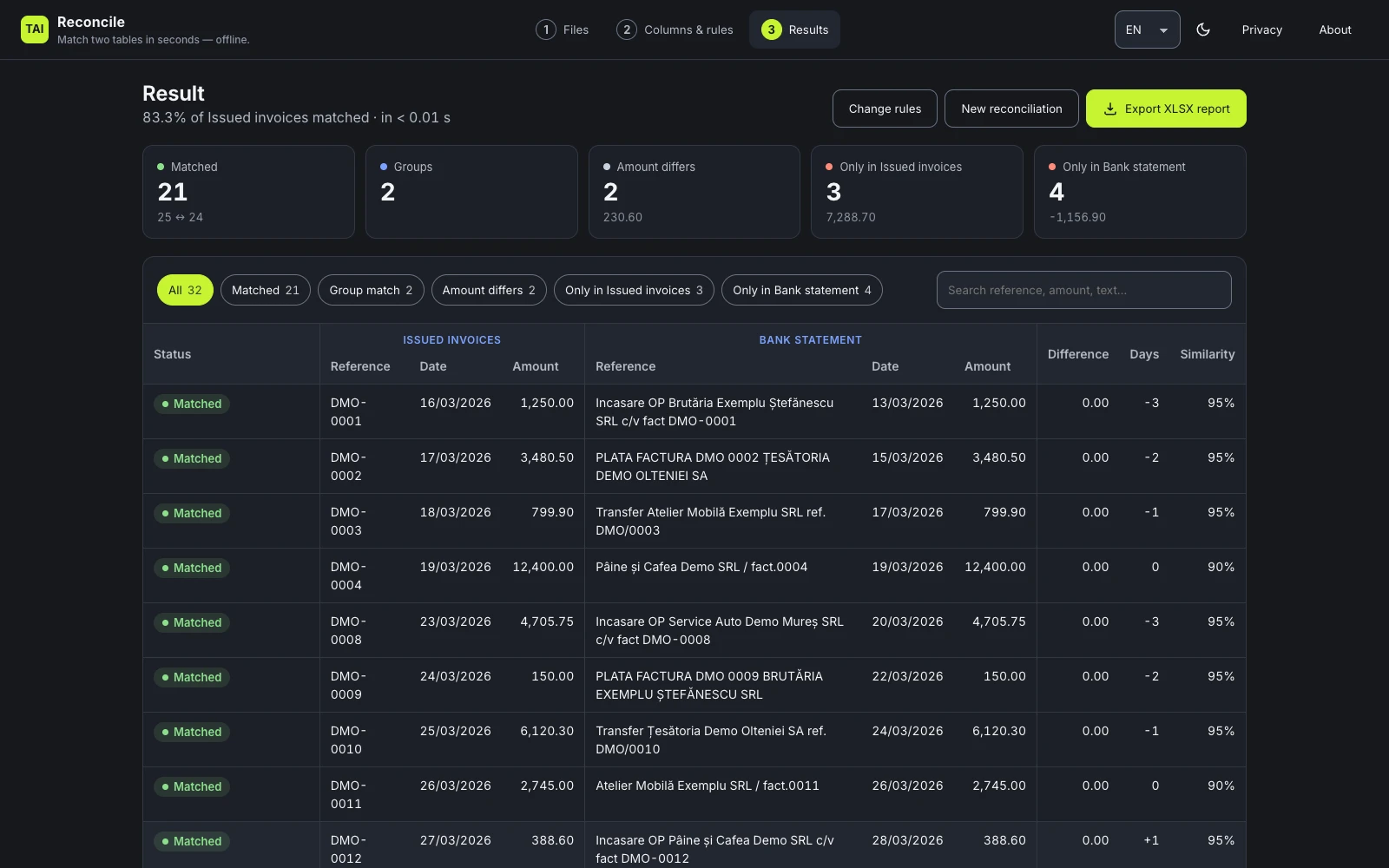
TAI Reconcile results screen (the sample files have Romanian names): totals for matches, groups and amount differences, the filter buttons and the first matched invoice and bank lines

Desktop · Windows · macOS

TAI Reconcile Version 1.2.2

Reconcile two spreadsheets (invoices ↔ bank statement, stock ↔ count) in seconds — fully offline.

What it does
  • CSV, XLSX, XLS and ODS files, by drag and drop — several files per side, each row keeps its source file
  • Finds the amount, date and reference columns by itself
  • Amount tolerance, a ± day window, similar references and one-to-many groups
  • Results you can filter, and an XLSX report
  • An example report and four ready-made input templates in the built-in guide
  • 50,000 × 50,000 rows matched in

Desktop app: no network requests — works offline. In the browser: your files are read on your device and never uploaded.

automated checks · 0 network requests (desktop app)

How it was tested

46 unit tests of the matching engine and file reading; 29 end-to-end checks on the packaged macOS app, including the network (0 requests); 54 checks of the installer contents. In the packaged app, matching 50,000 × 50,000 rows took 1.6 s; reading the XLSX took 0.4 s.

Limits

Unsigned, so the system warns at first launch. The Windows installer has not been run on a real Windows PC yet — it was built on a Mac and its contents checked. The timings come from one test machine; yours may differ. Password-protected Excel files don’t open; on very large files, one-to-many matching needs a reference column.

Source type

Test reports — not shown.

Installers

  • Windows 10/11 x64 · .exe · 103.4 MB
  • macOS 13+ · Apple silicon .dmg · 116.2 MB
  • macOS 13+ · Intel .dmg · 119.9 MB

Each installer is about 103–120 MB. Not sure which one fits your computer? Ask me:

Sample files (fictional “Demo SRL”)

Installing TAI Reconcile (unsigned app) · SHA-256

The app has no code-signing certificate yet, so the system warns you the first time it opens.

  • Windows: if “Windows protected your PC” appears, choose More info → Run anyway.
  • macOS: open the .dmg and drag TAI Reconcile to Applications. If macOS says it can’t be opened: System Settings › Privacy & Security → Open Anyway.

SHA-256

To check that the file you received is the original:

TAI-Reconcile-Setup-1.2.2-win-x64.exe
c0bc97726f66b5e60ff4ba9bfd8a39e400d3ac5e28aec1c9467c622db4321cf9
TAI-Reconcile-1.2.2-mac-arm64.dmg
c206cb01424b62a604605e434e64718d386c634a5905b1f5f3201900319804da
TAI-Reconcile-1.2.2-mac-x64.dmg
a41ef74955a24408e7ef7ca16dc2c6e35804f6c0acc6c50a7951e58ed3967e48
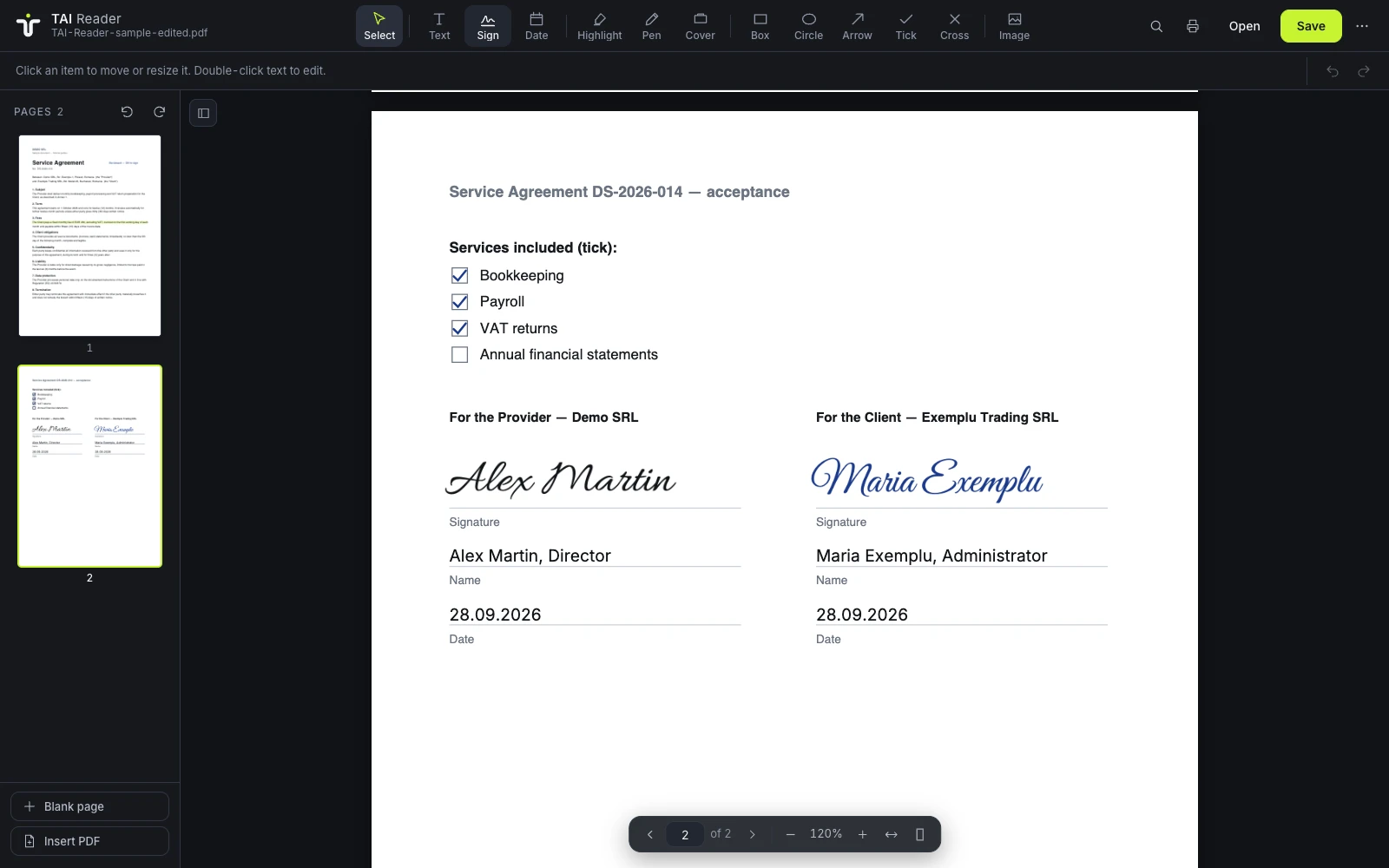
TAI Reader with a sample contract open: the acceptance page with three services ticked, two signatures, names and dates, with the tool bar above

Desktop · Windows · macOS

TAI Reader Version 1.1.3

An offline PDF reader: read, sign, write on and rearrange pages — documents and signatures stay on your computer.

What it does
  • Read: page thumbnails, zoom, search, copy text, print
  • Sign: draw it, type your name or use a photo of your signature
  • Write and mark up: text, date, ticks, highlight, pen, shapes, images
  • Pages: rotate, delete, reorder, add a blank page, insert another PDF

Desktop app: no network requests — works offline. In the browser: your files are read on your device and never uploaded.

automated checks · 0 network requests (desktop app)

How it was tested

36 checks in the app’s web engine: every tool except image insertion used with a real mouse and keyboard, page operations run through the app’s own functions, the saved PDF read back and compared with the screen; 22 checks on the packaged desktop app (Apple silicon), including saving and refusing writes to unapproved folders; 8 checks of the installer contents (both DMGs, the Windows installer and the portable ZIP). Network requests measured: 0.

Limits

Unsigned, so the system warns at first launch. The Windows installer and the portable ZIP have not been run on a real Windows PC, and the Intel package has not been run on an Intel Mac. The Cover tool only hides text visually — it is not redaction and does not remove the text from the file. Password-protected PDFs can be read and printed, not edited. Symbols the built-in font lacks, such as emoji, may show as empty boxes in the saved PDF.

Source type

Test reports — not shown.

Installers

  • Windows 10/11 x64 · .exe · 105.5 MB
  • Windows 10/11 · portable x64 · .zip · 145.2 MB
  • macOS 13+ · Apple silicon .dmg · 119.2 MB
  • macOS 13+ · Intel .dmg · 122.9 MB

Each installer is about 105–146 MB. Not sure which one fits your computer? Ask me:

Sample files (fictional companies)

Installing TAI Reader (unsigned app) · SHA-256

The app has no code-signing certificate yet, so the system warns you the first time it opens.

  • Windows: at the SmartScreen warning, choose More info → Run anyway.
  • macOS: open the .dmg and drag TAI Reader to Applications. At first launch: System Settings › Privacy & Security → Open Anyway.

SHA-256

To check that the file you received is the original:

TAI-Reader-Setup-1.1.3-win-x64.exe
a068d2ad4657d8363de5d812b11049fd61c510a94160a06d6e523d5e6696c5b9
TAI-Reader-1.1.3-win-x64-portable.zip
71c3b944125b54587ae0e7832d56f9a0741fc213baa0de5a04c17302116671c2
TAI-Reader-1.1.3-mac-arm64.dmg
cd1aac98c3fc64d667460032028a40f35c755c8366f3596eee68c060dff9a57d
TAI-Reader-1.1.3-mac-x64.dmg
dd40a23068a1607554efd9b4d550cf38dc580fa3c47e119b46d7d9b32875c05a

What I build

Websites, desktop apps and phone apps — one plan, one person.

Web

Websites

I build sites your customers find on their phone and understand in seconds — from a one-page site to a business site in two languages.

What you get

  • Your domain and security certificate (the padlock)
  • An accessibility check (WCAG 2.1 AA) and speed targets for phones
  • Care from €25/month after launch

from €150

Windows & macOS

Desktop apps

I build Windows and macOS apps for the work your team does at a desk: internal tools, file converters, report generators.

What you get

  • An installer for each computer — Windows, macOS or both
  • Updates when your process changes
  • Fixes and care after delivery

Quoted after a first call

Android & iOS

Phone apps

I build Android and iOS apps for bookings, orders and check-ins — through the App Store and Google Play, or without a store, as a web app that installs straight onto the phone.

What you get

  • One plan for Android and iOS
  • Published in the App Store and Google Play under your own account — or no store at all
  • Updates and care after launch

Quoted after a first call

Real, live work

Not just a demo: a site and apps I built and run.

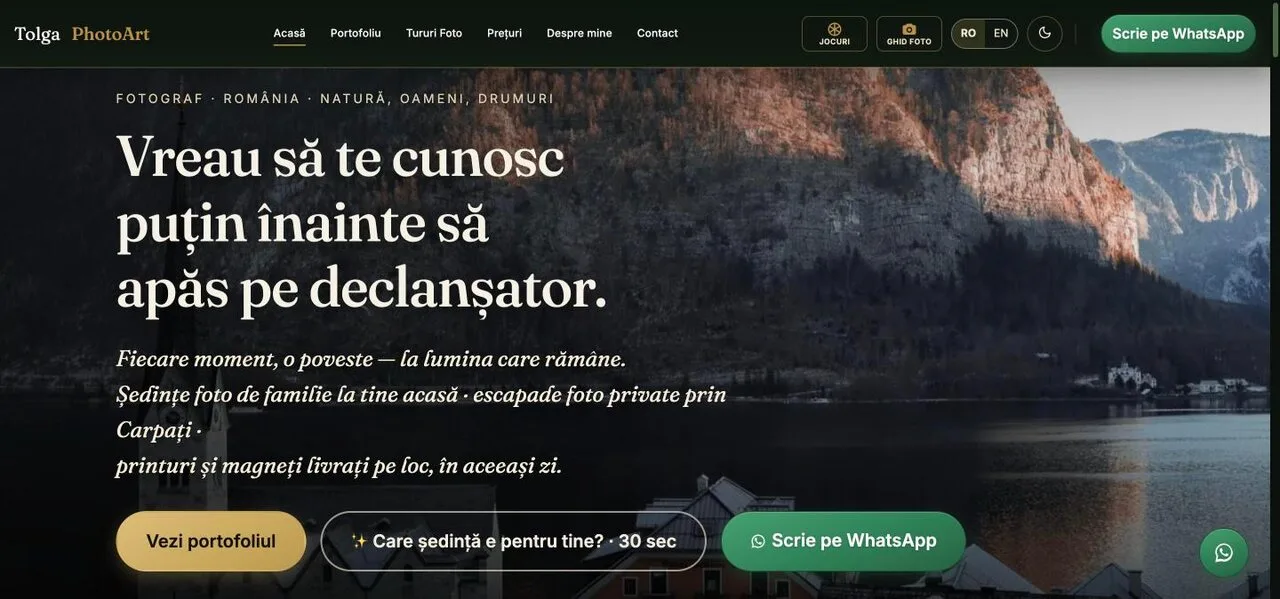
tolgaphotoart.com homepage
Recoloured preview

Live since July 2026

tolgaphotoart.com (separate site, uses Google Analytics)

My own photography business site, in Romanian and English — planned from fifteen working documents before any code.

  • A 61-page sitemap in Romanian and English
  • Nothing jumps while it loads: layout shift in three Lighthouse mobile runs
  • Smooth transitions between pages, prerendering and scroll-driven animation
  • A token-protected admin panel for visitor statistics and WhatsApp leads

How it was measured

Three Lighthouse mobile runs on 24 September 2026; layout shift was 0 in all three.

Limits

A lab measurement of that site on that day, not data from its visitors; your site is measured on its own.

Source type

Lighthouse reports — not shown.

Apps you can open right now

Seven of my browser apps and games are live and install on a phone. Four of them are real-time multiplayer — the same room on phone and desktop.

  • Nickname only — no sign-up
  • Password-protected rooms
  • Bots fill empty seats
  • Five languages, chosen per player

Built with

  • Cloudflare Workers + Durable Objects
  • WebSocket
  • PWA

They run on tolgaphotoart.com, a separate site of mine that uses Google Analytics; links open in a new tab. A free side project, not a service with an uptime promise.

All seven apps (opens in a new tab · separate site, uses Google Analytics)

How it works

From your brief to a live site or app in four steps.

  1. 01

    Brief

    You tell me what you do, who will use it and what they should be able to do next: call, book, order or check in.

  2. 02

    Plan

    Goals, users, screens and the look on paper before any code — for a website, fifteen working documents with accessibility and speed targets.

  3. 03

    Build and check

    Built from that plan, then checked: a website for accessibility (WCAG 2.1 AA), speed and search; an app on the systems you use — Windows, macOS, Android or iOS.

  4. 04

    Launch and care

    Your site goes live on Cloudflare Pages with your domain and the padlock; your app arrives as an installer, through the stores or straight onto the phone. Care after launch.

Prices

Clear prices, agreed before the work starts.

One-pager

from €150

One page that says what you do, for whom and how to reach you — fast on a phone.

  • Built for phones first
  • Your domain and security certificate
  • Same planning process, one page
Get a one-pager quote — from €150

Custom website

€400–€900

Analysis to launch — for a business with several services or pages.

  • A look made for your brand — colours, type, buttons
  • Accessibility check (WCAG 2.1 AA)
  • Speed targets for phones, checked before launch
  • Set up so Google reads it correctly (technical SEO)
  • Your own domain and security certificate

Builds with real integrations behind them go above this band — quoted up front, never open-ended.

Get a site quote

Care plan

from €25 / month

Updates, fixes and small content changes after launch, by the person who built the site.

  • Updates and fixes
  • Small content changes
  • One person who knows your site
Ask about the care plan

Desktop & phone apps

Quoted after a first call

Windows, macOS, Android or iOS — priced once I know the screens, the users and the systems it has to talk to.

  • A written quote before any work starts
  • An installer, the app stores or install-from-the-browser
  • Updates and care after delivery
Talk about an app

Indicative prices in EUR · final offer in writing.

Questions

Before you ask.

Is the demo what my site or app would look like?

No — it is a sample generated in your browser, to show the idea in seconds. Your site or app starts from what you tell me: your goals, who will use it, the screens and the look — for a website, fifteen working documents, before any code.

One-pager or full website — which one do I need?

A one-pager (from €150) is enough when people mainly need to know what you do and how to reach you. A custom website (€400–€900) fits when you have several services, want to be found for more searches or need two languages. Not sure? Tell me what you do and I’ll say which.

Desktop or phone app — which do I need?

A desktop app fits work done at a desk: a team that edits tables, converts files or prints reports on Windows or macOS computers. A phone app fits people on the move: bookings, orders, check-ins, photos from the field. Many businesses need neither — a good website does the job. Tell me who will use it and where, and I’ll say which.

Do apps go to the App Store / Google Play?

If you need them there, yes: I prepare the release for the App Store and Google Play under your own developer account, so the app stays yours — the developer accounts and their fees are in your name. Store review is Apple’s and Google’s decision, so I can’t promise the timing. For an internal tool a store is often not needed: a web app installs straight onto the phone from the browser, and a desktop app comes with its own installer.

What happens after launch?

With the care plan (from €25/month) I handle updates, fixes and small content changes to your site — the same person who built it. For apps, care is agreed in the quote.

I sell online in the EU. What about the accessibility rules?

I don’t give legal advice on whether they apply to you. What I do: a WCAG 2.1 AA audit against your real pages, each finding scored by effort and risk, the fixes applied, and a written record of what was checked and how.

Tell me about your business.

Two or three sentences are enough. You get a fixed quote before any work starts — or an honest “not for me”.

Or write on WhatsApp: +40 752 494 070 · tolga@taisolutions.net